This is a fork of "official" PDCurses (GitHub source for the "official" project is here). The "official" PDCurses was inactive for some time, and (as of late 2020) appears to be dormant again.
Note that PDCursesMod is now on GitHub, and you should look there for current information. I moved it there in early 2016; this is really 'archival' information about what happened before early 2016 and some overview of why I started this fork, capabilities, etc.
This fork started out with the addition of a Windows GDI mode, alongside existing Win32 console, OS/2, X11, and SDL1 modes. The Windows console has a limited set of colors and no bold or italic text; going to a GDI mode, where we could draw whatever we wanted, meant that we could implement essentially everything specified in Curses.
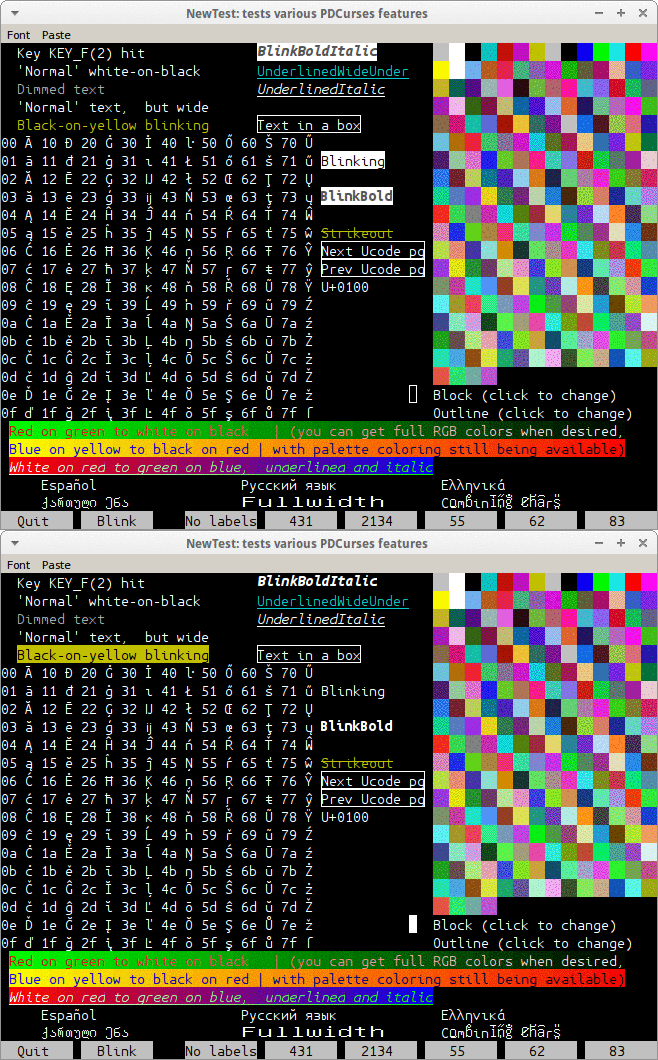
This screen shot shows some of the things this fork of PDCurses can do, such as display of bold, italic, underlined, overlined, dimmed, 'strikeout', blinking text, full RGB colors, display of the full range of Unicode, a range of blinking cursor styles and blinking text, and fullwidth and and combined characters. All of this is backward-compatible to the original PDCurses specification. Much of it has now worked its way into the X11 and SDL1 flavors, and there is now an SDL2 flavor as well (added from "official" PDCurses). We've since added Plan9, VT-like, and DOSVGA flavors.
Important note: This fork of PDCurses was documented here, until early 2016. The current version of the source code for this project is now available on GitHub, and that's where you should go to get information on what has changed since 2016. When we realized the fork was probably of a permanent nature, we changed the name to PDCursesMod to reflect both its heritage (most of the basic code really came from PDCurses) and the fact that it really is quite extensively "modified" from that heritage.
This page may still be of historical interest, since it documents what happened in this fork before early 2016. much happened before the GitHub move.
The version on GitHub has moved on a lot since the 2015 August 27 version described on this page : the X11 flavor of PDCurses now has most of the capabilities of the Win32a flavor (with still more X11 improvements thanks to Mark Hessling, and an entirely new SDL2 flavor thanks to Laura Michaels), plus a 'DOSVGA', Plan9, and VT-like version. Many bugs have been fixed; the (W)ACS ((Wide) Alternative Character Set) defines have been expanded from 32 to 114... full commit history is here.
"Official" PDCurses currently comes in several flavors: DOS, Win32 console, XCurses, OS/2, and SDL1. These each have merits and demerits, but none actually implements all PDCurses capabilities. For example, only XCurses and SDL1 allow for underlined and left/right lined text. Most versions don't implement italic or blinking text, and "bold" text usually just means "brighter color" text. The machines may support lots of colors, but PDCurses usually supports 16 or 8. Mouse wheel events and double-clicks aren't always handled. I wanted a full-capability, no-compromises version of PDCurses.
One possibility would have been to modify the SDL1 version (the SDL2 version wasn't available at the time). That would have made some sense; I'd have had to add bold and italic fonts, blinking text, and revised it to support 256 colors (now full RGB). It would give me a cross-platform solution (though since Win32a works perfectly with Wine, it really is cross-platform). However, I thought it wouldn't take too long to make a for-real Windows version. Silly me! Also, at the time, SDL1 had a huge drawback from my point of view: lack of Unicode support. The SDL2 flavor does now supports Unicode, but that wasn't at all true until early 2016.
At present, the Win32 GDI flavor of PDCurses in this fork supports absolutely everything known to Curses, even nearly useless features such as triple mouse clicks. All display attributes work, and all mouse and keyboard events are detected. The window can be resized, programmatically or by the user (*), and fonts and font sizes can be chosen. The user can click and drag a rectangle or paragraph and have it copied to the clipboard, and/or paste from the clipboard to the input stream. Most of these improvements now also exist in the X11 version in this fork; some of them exist in SDL2; and some apply even to DOS and the Windows console flavors, and probably to OS/2.
I have made some extensions to PDCurses, but backward compatibility has been key. None of the original features of PDCurses has been broken. You should be able to compile your legacy PDCurses apps with this new library, and all should work Just Fine.
The Win32 GDI flavor is currently known as Win32a, just to distinguish it from the "real", console-based Win32 version. The name is unfortunate. This flavor uses the Win32 API, but it can be compiled and run in 64 bits. It has been suggested that it should be renamed to "WinGDI or "GDICurses"; unfortunately, it's probably too late to do that.
Some of the Win32a features now exist in the X11 and SDL2 flavors, such as overlined, struck-out, dimmed, italic, and bold text; 256 colors and color pairs, as well as full RGB; triple mouse clicks; and more. (Programmatic resizing and blinking text, Unicode past 64K, and combining characters remain to be done, at least as of January 2016, and SDL2 support of these features lags that of X11.) When I started work on Win32a, I was predominantly a Windows programmer. I've since shifted to doing almost all my work on Linux, and would like to have the same capabilities in the X11 flavor as in the Win32a flavor.
Like the rest of PDCurses, this fork is in the public domain. I had hopes of getting these changes merged into mainstream PDCurses, and put in a pull request, which hasn't gone anywhere. The "mainstream" PDCurses project appears to be inactive.
"Public domain" does mean that you can do whatever you want with the code; you don't need to release your changes, for example. However, I do appreciate any bug reports, fixes, suggestions for improvements, etc. You can contact me.
I was providing a .zip-ball of the source code. I've removed it; you should get the current source code from GitHub.
This improvement applies to all flavors of PDCurses, including DOS and OS/2 (though the OS/2 flavor is untested, at least by me.)
Soft Label Keys (SLKs) are shown at the bottom of the screen shot at the top of this page: they provide a simple way to make sure that there are a few buttons, which can be user-labelled, at the bottom of the window. A line or two has to be sacrificed to accommodate them. Click on the buttons, and it's as if you hit a function key.
In current PDCurses, you can have only certain configurations of buttons: "3-2-3" format (three buttons on the left and right sides and two in the middle), "4-4" format (four on each side), "4-4-4", "5-5", and "4-4-4 with index", in which above each button is a label giving the corresponding function key. You can't get any other format, nor can you change formats in mid-program.
The revised slk.c in this fork fixes both limitations. As is described in the code itself, you can get essentially any label layout you want. (This actually resulted in somewhat simpler code. The original version treated each layout as a special case, without recognizing that they could be handled in a common manner.) I also found that by adding a couple of lines of code, I was able to allow changes in format in mid-program; see newtest.c (part of the source code) for an example.
You do still have to set up soft label keys before the window is initialized. Turning SLKs on (or off) after the window was created would mean adding (or removing) lines from the main window, and I've not seen a good way to do that.
I think the OS/2 version still works. Unsurprisingly, I don't have an OS/2 box. I tried installing the eComStation "modern" version of OS/2, without success. If I ever get that to work, it might allow a new lease on life for the OS/2 flavor of PDCurses.
(As of 2017 Feb 1. "Win32" = "Win32 console". Note that ncurses does a decent job with many of these features.)
                        DOS OS/2 Win32 Win32a SDL1 SDL2 X11 ncurses
Combining characters                     x                    x  32 (wide only)
Fullwidth characters                     x                    x  32 (wide only)
RGB colors                               x               x       64
256 colors                               x     x    x    x    x  32
Overline/strikeout                       x     x    x    x       64
--------------------------------------------------------------
Under/left/right                         x     x    x    x       32
Triple clicks                            x               x    x
Bold fonts                               x               x    x
Italic fonts                             x               x       32
Cursor styles                            x               x
--------------------------------------------------------------
Unicode (64K, BMP)                 x     x          x    x    x  32 (wide only) (Unicode values <= 0xffff)
Unicode (SMP)                            x                    x  64 (wide only) (Unicode values >= 0x10000)
"Real" blinking text                     x               x
Dimmed text                              x               x       64
                        DOS OS/2 Win32 Win32a SDL1 SDL2 X11
As noted, some features also require 32-bit or 64-bit chtypes, and some need wide character mode to be enabled. (Also note that this just lists features that have been added to this fork; it, and its parent branch, already supported most Curses/ncurses features.)
In theory, the SDL1, SDL2, and X11 versions could catch up with the Win32a features. Mark Hessling has put some effort in bringing the X11 version up to speed, and I've added a little code there as well. SDL1 may be of historical interest only. SDL1 itself appears to be in "maintenance mode" at best (its developers strongly urge people to move to SDL2). And from a PDCurses perspective, the restriction to an 8-bit character set is a real problem.
(Note that all changes after 2016 January 19 will appear on, and be documented via, GitHub. This is still useful in figuring out changes made before that date.)
• Moved to GitHub: As described above, the most current version of the source is now at GitHub. I've put in a request to have it pulled in to the 'official' PDCurses source; I don't know if it will actually go through (nothing appears to be happening, and it may be that the 'official' fork is essentially dead.)
• "Fallback font" capability: Most popular fonts don't support anywhere near the full range of Unicode characters, resulting in some text appearing as question marks or blanks or squares with hexadecimal digits in them. To get around this, some applications use a fallback font. For Win32a, that fallback font is GNU Unifont. Install GNU Unifont on your system, and the question marks/blanks/squares will be replaced with a passable glyph.
For example, in the screenshot at the top of the page, most of the text is drawn using the Ubuntu Mono font (I created that screenshot running newtest on Wine). But Ubuntu Mono didn't have combining characters or fullwidth forms; that issue was detected, and those characters were drawn using GNU Unifont. Note that if you don't have GNU Unifont installed, Win32a will have no way of drawing those glyphs, and you're still stuck with question marks and such for unsupported characters.
• GDI resource leak fixed: If text was under/over/left/right-lined, or was struck out, the GDI "pen" created for that line wasn't freed. Each time that text was redrawn, another GDI pen was allocated. This did not appear to be a problem under Microsoft Windows, which apparently allows for plenty of pens. But in Wine, if you ran (for example) newtest, which has lots of lined text, and made the window smaller or larger enough times, you could run out of GDI resources and crash. This has been fixed.
• SLK (Soft-Label Keys) fix: The display of Soft Label Keys turned out to have a defect: if the label was initially created with insufficient space, so that its display on-screen was truncated, it would stay that way even if you resized the window to make it wide enough to accommodate more characters. This is fixed, and as a bonus, the code is a little simpler than it previously was. (As with other SLK fixes, this applies to all flavors of PDCurses, not just the Win32a flavor.)
• Intel® compiler make file: Arlen B. Taylor has kindly contributed iccwin32.mak, a makefile for the Intel® C compiler. It turns out that this can be done by starting with the makefile for MS Visual Studio, vcwin32.mak, and replacing cl.exe and link.exe with icl.exe and xilink.exe.
• Inclusion of DOS, Win32 console, SDL, and X11 flavors: I've hopes of getting this "fork" of PDCurses re-integrated with mainline PDCurses (push request here). It's unclear if this will actually happen; William McBrine is somewhat ambivalent about some of the choices made in Win32a. But I'd like to maintain the possibility of merging. It would certainly simplify matters if we had one PDCurses rather than two.
There is no theoretical problem with merging, since there's nothing in this flavor that would conflict with mainline PDCurses (backward compatibility has been carefully maintained). It turned out that no major changes were required to get the other flavors to be compatible with Win32a. I was unable to test the OS/2 or FlexOS flavors. I am pretty confident they will work; aside from testing that out, I think re-integration of Win32a with mainline PDCurses can go forward.
The benefits to the other flavors are a mixed bag, from "lots of nifty stuff" (for X11 and SDL, especially) to "a few nice, but minor, improvements" (DOS, OS/2). Thus far, only the Win32a flavor has a range of blinking cursor styles , fullwidth and and combined characters, and triple mouse clicks. The X11 flavor has just about everything else, in large part thanks to code supplied by Mark Hessling. SDL lacks RGB text or blinking of any sort, cursor or text; I'm not sure there is a way to implement them in SDL. However, thanks to code supplied by Laura Michaels, the SDL flavor now supports Unicode, which fixes a truly crippling barrier to SDL use: it previously only supported 8-bit text.
All flavors get the SLK (Soft Label Key) improvements. The X11, SDL, and Win32a flavors all allow one to call resize_term( ) before initscr( ) to set an initial screen size.
• Fullwidth and combining-character forms: Win32a now supports fullwidth forms and combining characters. You can click here to see what they look like. Fullwidth forms are common in CJK (Chinese, Japanese, Korean) computing: characters that occupy what would "normally" be considered to be two spaces. (From their viewpoint, "fullwidth" is normal, and it's Latin characters that are considered to be "halfwidth"; see the linked article.)
Essentially, this just means that if you ask Win32a to display a fullwidth character, it will be shown correctly, and the cursor will advance two character cells instead of one. That way, the next character displayed won't simply wipe out the right half of the character you previously added.
Combining characters allow one to a variety of accents and diacritical marks to other characters. You can, of course, already show (for example) a lowercase 'o' with a circumflex: ô has Unicode point U+00F4. But combining characters allow one to add a circumflex to any character, by adding the combining mark U+0302. One can even then add multiple marks; for example, 'z' followed by U+302 followed by U+317 would be a 'z' with circumflex and an acute accent below : ẑ̗ .
This can be useful both for internationalization and in the display of certain mathematical formulae. For example, the ability to put carets over letters to indicate unit vectors, or arrows to indicate vector quantities, or dots/double-dots to indicate first/second derivatives, can be helpful: p̂, r⃗, Ẋ, z̈ .
Examples of both fulltext display and combining characters are given in the newtest program. Examining newtest.c should make it clear how to use these. But be warned that font support for these wonders appears to be quite sketchy. To be reasonably confident of getting such characters, you will probably have to install GNU Unifont, which will then be used as a fallback font for any otherwise unsupported characters.
• Unicode input by numeric codes: Darrin Wolf asked about the possibility of being able to hold down Alt and press, say, "99" or "378" on the numeric keypad to get Unicode 99 (c) or 378 (ź). Similarly, one should be able to hit Alt-+ (numeric keypad '+'), and while holding down the Alt key, enter a hexadecimal value. (For hex entry, the digits can come from either the numeric keypad or the regular keyboard.) Win32a now supports this.
Note that on the X11 version, you can now hit Ctrl-Shift-U and type hex digits for a Unicode point, then Enter.
• OpenWATCOM fixes: Jens Staal pointed out some fixes needed for a Linux port of the OpenWATCOM compiler, mostly involving issues such as the path separator being '/' instead of '\', and command-line switches being '-' instead of '/'.
• 64-bit compiles: Elias Hogstvedt pointed out that if you want to compile Win32a in 64 bits, you just need to modify vcwin32.mak to replace the line /MACHINE:IX86 to read /MACHINE:X64. I added a comment to this effect in the makefile.
• Alignment issue fixed: Amanieu d'Antras pointed out that if you compile Win32a using MinGW, there's a possible alignment issue: MinGW expects the stack to be aligned to 16 bytes when you enter a function, but Windows only guarantees a four-byte alignment. It's not usually an issue (this is the first time I've ever heard of it), because MinGW is bright enough to handle it in most cases. But for a callback function, it can be a problem... which is why WndProc( ) in pdcscrn.c now has an ALIGN_STACK attribute.
• Wide-character input: Florian Große-Coosmann pointed out several problems in the way Win32a (and other flavors of PDCurses) handle wide input. In particular, there was a problem because the KEY_ codes ran from 256 (hex 100) to 520 (hex 388). If you use a Russian or Romanian layout (and some others), then your input in those languages could be falsely labelled as "special" keys such as function keys. Florian suggested that this could be fixed by having the KEY_ codes run from 0xEC00 to 0xED88. That puts them in the Unicode 'private use' area, which means they should never correspond to "real" characters.
Update: when I mentioned this about a year later on the PDCurses mailing list, William McBrine pointed out a much better solution. If you use get_wch( ), the return value will be KEY_CODE_YES if it's actually a key code, or OK if it's a for-real Unicode value. This has the virtue of working not just with PDCurses, but with ncurses as well. So while Win32a does now put KEY_ codes in an otherwise unused range, and you can use this safely with Win32a only, I would still recommend relying on the more portable get_wch( ) solution; it may spare you a nasty surprise should you ever port your code to use ncurses.
Note that this was only a problem in the 'wide' versions of PDCurses (since you can't get "normal" keycodes past 255 in non-wide versions anyway). Thus, it could affect not only Win32a, but the console Win32 and X11 flavors of PDCurses. (OS/2, DOS, and SDL don't support wide-character versions of PDCurses.)
Also, because it's not an issue with non-wide PDCurses, I left the KEY_ codes unchanged in 8-bit (non-wide) PDCurses; they still start at 256 in that case. This may save somebody from some weird backward-compatibility issue (say, if they hardcoded the KEY_ values... I suppose if you did something that foolish, you probably deserve to have Bad Things happen to your program, though!)
Also, be warned: Unicode means somebody might enter characters with values greater than KEY_MAX in the 'wide' flavors of PDCurses. If your code does something such as if( key < KEY_MIN) { process as if it's an ordinary key }, you may run into trouble. (Though for many languages, you'll never reach that high a Unicode value.) It's best to use the has_key( ) function, which basically just checks that KEY_MIN <= key <= KEY_MAX.
• Cross-compiling from Linux: I revised mingwin32.mak to allow one to use MinGW on Linux to cross-compile this library. To do so, you need to add the argument _linux=1 to the make command line. The one oddity here is that the MinGW executable can have any of four different names, depending on whether the host is 32 or 64-bit and whether the target is 32 or 64-bit. I've set it up for my own 64-bit Linux box building 32-bit Windows code, resulting in my setting PREFIX = x86_64-w64-mingw32-. You may have to revise this; I don't think you'll have to change anything else. (If running MinGW on a for-real Windows machine, you won't have to do anything at all; it will work as before.)
• Fix to window resizing: Amanieu d'Antras pointed out that in Vista and later forks of Windows, a Win32a window could "collapse" because of the code I used to determine the difference between the client rectangle and the full application window rectangle. He supplied a patch that uses the Win32 API AdjustWindowRect function, which both removes the bug and makes the code a lot easier to follow and less kludgey, all at the same time. Definitely a welcome contribution.
• Fix to double/triple mouse clicks: I realized that the code to determine whether a mouse click was single, double, or triple was flawed: I was getting double and triple clicks in situations where I had waited several seconds since clicking the mouse. This turned out to be due to my use of the clock( ) function, which apparently measures the process time, not the "wall clock" time (the time you'd see elapse if you looked at a clock on a wall). So you might think several seconds had elapsed between two clicks, but your application would only have been busy for a few milliseconds between the clicks and would decide you'd double-clicked. The fix, again, was to use a suitable Win32 API function that gets "wall clock" time (the sort of time a clock on a wall would show); for details, check the milliseconds_since_1970( ) function in pdcscrn.c.
• A_DIM attribute now works: When using 64-bit chtypes, one can now set the A_DIM attribute type, and the text will actually be dimmed. (With 16 or 32-bit chtypes, and on all other flavors of PDCurses, A_DIM is defined to be equal to A_NORMAL.) The use of this attribute is demonstrated in newtest.c.
• Fix for crashes with shrinking windows: A bug and its fix, applying to all flavors of PDCurses, was posted on the PDCurses mailing list. Essentially, you could conceivably get crashes if a window was shrunk and the cursor ended up outside the new window. The new version incorporates the fix.
• Support for the really full range of Unicode: I originally set up 64-bit chtypes so that they could contain Unicode values up to twenty bits. This seemed absurd overkill. However, the upper range of Unicode is 0x10ffff, so that 21 bits really should be allowed. Fortunately, I was able to do that with only a couple of lines revised. Unfortunately, it does mean that the attribute bits are shifted up by one; you'll have to recompile everything to use the current version. (Note that this applies only to the 64-bit flavor of Win32a. That's the default, though, and I'd bet few people are using 32-bit or 16-bit chtypes these days.)
Note that getting such characters to appear is a little difficult; few fonts support anything beyond the "Basic Multilingual Plane" (BMP) characters, going up to U+FFFF. I tried revising testcurs.c to display the character U+1D11E, which should correspond to the musical symbol G clef... which may or may not show up correctly in your browser: 𝄞 I have been able to get this to display in testcurs in Windows 8, using a 'Musica' font that had that particular symbol.
• In investigating the above problem, I realized that Windows uses UTF-16, in which wchar_t is sixteen bits and Unicode characters beyond U+FFFF are displayed using "surrogate characters". Some revision to pdcdisp.c enabled this feature.
• Win32a stored information about font choice and window sizing/placement in the registry under HKEY_LOCAL_MACHINE. Mark Hessling pointed out that, while this works under WinXP and previous forks of Windows, it fails on Windows 7 (or any Windows with UAC). In that situation, you need administrative rights to change that part of the registry.
The fix was to instead store the font and window sizing/placement information under HKEY_CURRENT_USER. Two lines of code were suitably changed.
• Mark Hessling spotted some errors in wide-character support in Win32a and in the handling of SLKs (soft-label keys) and supplied bug fixes. He also noticed that if you use 64-bit chtypes with the Win32 console or DOS flavors of PDCurses, things broke rather badly. It turned out that I had to slightly modify three source files for the Win32 console flavor and one for the DOS flavor; these are now included in the download.
To test out the SLK changes, I had to modify newtest to allow for a feature to toggle display of SLKs. (When you turn them off, the SLK area goes blank and stays blank; you don't suddenly get one or two more lines to play with.)
• The 'enlarge font' and 'shrink font' options are now missing from the menu, and a new 'Font' option has been added. Click on this, and you can choose the font used in the window (size and type). You can also hit Ctrl-Comma to access this dialog.
Note that while you can now select any font you want, not all fonts will work equally well. The display is fixed-pitch; non-proportional fonts will usually look pretty weird. Not all fonts support the box-and-lines type alternative characters. I originally chose Courier New because it supports absolutely everything, including non-Latin alphabets. Still, for a lot of purposes, you'll find that other fonts work Just Fine.
• Jason Foley pointed out that Win32a didn't register most Ctrl-Shift key combinations as events, and didn't recognize Ctrl-Alt anything. I was able to fix the former easily enough. The latter is a stickier wicket, now described in comments in pdcscrn.c. Basically, some keyboards consider Ctrl-Alt to be a modifier to get characters not otherwise available. For example, on a Swedish keyboard, Shift-2 gets a " (double quote) mark, and Ctrl-Alt-2 gets a @. We really should, when using a Swedish layout, return a key for Ctrl-Alt-1, but not for Ctrl-Alt-2; Windows will "convert" that into an at-sign, and we'd feed two characters to the user.
At least for the nonce, therefore, Win32a still doesn't return Ctrl-Alt combinations, unless one sets the new external variable PDC_show_ctrl_alts to a non-zero value.
• Roald Ribe pointed out that the most recent version failed when run in Windows 7. I borrowed a Win7 machine and replicated the failure. It turned out that the window style used for non-resizable windows was wrong. This is now fixed. I also rearranged the newtest demo program's screen (as shown in the image at the top of this page) so that it would be useable in the default 25-line/80-column mode.
Fixes (2012 Oct 31 and 2012 Oct 18):
• Xavier Wang found and fixed bugs occurring when apps didn't handle user resizing messages. This is quite common, because only the X11, Win32a, and SDL platforms support user resizing at all. When apps written for the DOS, OS/2 or Windows versions are linked to Win32a and the user changes the window size, you could get garbage on the screen, or crashes. Xavier fixed this.
Thinking about this caused me to change the behavior of Win32a. There is no way for Win32a to know in advance if an application has been written to handle user resizing correctly. So Win32a now defaults to non-user-resizable windows, with two ways to get resizable windows.
You can, before calling initscr( ) or Xinitscr( ), signal to Win32a that the window can be resized from 20 to 55 lines, and 70 to 100 columns, by calling
PDC_set_resize_limits( 20, 55, 70, 100);
The above has only one slight flaw: the PDC_set_resize_limits( ) function exists, at present, only in Win32a. If you try to use it with other flavors of PDCurses, you'll get unresolved external function errors. Eventually, the function may exist in other flavors; in X11 and SDL, it could actually be "functional" (other flavors of PDCurses don't support resizing, so this would be a do-nothing function for them.)
Alternatively, you can (again, before calling initscr( ) or Xinitscr( )) set the following:
ttytype[0] = 20; /* Window must have at least 20 lines in Win32a */
ttytype[1] = 55; /* Window can have a max of 55 lines in Win32a */
ttytype[2] = 70; /* Window must have at least 70 columns in Win32a */
ttytype[3] = (unsigned char)200; /* Window can have a max of 200 columns in Win32a */
...which won't cause trouble with other flavors (they'll just ignore it), but which is inelegant and limits you to 255x255 windows. Though arguably, 255x255 windows should be big enough for anyone.
My thanks to Anatoly Techtonik for pointing out some problems in my original version of this feature.
• Xavier also pointed out that the window didn't capture mouse events. You could get strange behavior if you clicked within the Win32a window, dragged the mouse, and released the button somewhere outside the window. A few calls to SetCapture( ) and ReleaseCapture( ) fixed this.
• Roald Ribe provided a patch that made the WndProc( ) function in pdcdisp.c considerably cleaner. That function had become too large to be easily managed; the new arrangement is a little easier to follow.
• As is shown in the screen shot at the top of this page, one can get text to appear with any desired foreground and background colors; you aren't limited to the 256-color palette. You can just specify a foreground RGB and a background RGB for each character. For an example of how this is done, see newtest.c. Note that this works only when using 64-bit chtypes.
• I found that if you maximized a Win32a window, exited, and restarted the program, it would hang. Also, attempting to check for a key press wouldn't necessarily work, now that we aren't multi-threading: PDC_check_key( ) must explicitly check for new messages sent to the PDCurses window, in order to make sure that all keyboard events have been processed. Both bugs are now fixed.
• Previously, the window had been handled in a separate thread. This made the code somewhat more complicated than it had to be. More seriously, there were issues caused by the lack of re-entrancy in PDCurses. It was at least theoretically possible to have the window thread and the "main" outside-the-window-thread accessing variables simultaneously. A mutex helped to avoid this problem, sort of, but it wasn't a perfect fix. However, Roald Ribe figured out a nice way to avoid the need to multi-thread. The code is much saner and safer as a result.
• Roald also pointed out that a lot of code uses Xinitscr( ) when compiled for XCurses and initscr( ) otherwise. There is no good need for this. On non-XCurses platforms, initscr( ) simply calls Xinitscr( 0, NULL), and the argc and argv parameters are then ignored. So Xinitscr( ) is now enabled for all platforms. Use of it is actually a Good Thing; it makes it slightly more likely that the correct command line arguments will get to the library, which can then use them for setting the window title and getting the previous window state from the Registry.
• Roald also pointed
out that it would be nice to be able to select in
"paragraph style" instead of the default "block style". So you could
mark things like
<- From here, keep marking text until it wrap
s around, then keep on marking some more lines to b
e copied to clipboard until you've had enough, right
here->
...i.e., the way things usually get marked in most word processors. This is now enabled. Drag with the left mouse button pressed, and a paragraph will be highlighted and copied to the Windows clipboard when you let go of the button. (Hold down Shift when you press that mouse button, and you can get the previous block-marking and copying behavior.)
• Roald also provided some fixes to OpenWATCOM compilation to get proper symbols in the debugger and smooth out a few problems with that compiler.
• I made some changes in curses.h so that, when using 64-bit chtypes, one can specify Unicode characters up to 20 bits. Almost all "normal" Unicode characters fit within 16 bits -- hence the widespread use of UTF-16 -- but if you look at the Unicode code charts, you'll see that, for example, (Cretan) Linear B, Old Italic, Phaistos Disc, Shavian, Phoenician, and so on require a seventeenth bit. It does appear as if Unicode can require 21 bits, if one makes use of the "Private Use Area". But 20 bits appears to be overkill for all practical purposes. I also extended the color field within chtype to consume 31 bits. See newtest.c for an example of the use of this (or look at the screen shot at the top of this page). Basically, five bits each specify the foreground and background R, G, and B, plus one more "signal" bit to indicate that the color is to be treated in this manner, instead of as an index within a palette... that brings us up to 31 bits.
This color specification system could also apply to the SDL and XCurses flavors of PDCurses.
• By default, mouse move events are not reported, even if you use mouse_set( ALL_MOUSE_EVENTS). Looking at the definition of ALL_MOUSE_EVENTS in curses.h, this makes sense; all bits are set, except for the REPORT_MOUSE_POSITION button. Presumably, most of the time, you don't want a hailstorm of mouse events just because the user moved the mouse; but I assumed that if you called
mouse_set(ALL_MOUSE_EVENTS | REPORT_MOUSE_POSITION);
in 'testcurs', it would report all mouse movement. That didn't happen; it had no effect whatsoever. As of this commit on 2017 Feb 18, the above call does work properly with Win32a: you get a KEY_MOUSE event whenever the mouse moves, even if no button is pressed at the time. However, it currently works only in Win32a; the REPORT_MOUSE_POSITION flag is completely ignored in X11, SDL1 or 2, DOS, Win32 console, or OS/2.
• The extent of font support leaves something to be desired. Most fonts implement European language support, maybe a few symbols, and not much else. The Win32a flavor now implements a 'fallback font' capability, meaning that if a font lacks a particular glyph, we try to fill it in from GNU Unifont, which provides excellent support for almost all glyphs. GNU Unifont doesn't provide bold or italic characters, though, and only looks good at the 12-point size. Also, while it can support even the Supplemental Multilingual Planes (Unicode characters past U+0xFFFF), the Win32 API can only tell you which glyphs exist in the Basic Multilingual Plane. So I don't have a way of saying: "Does character U+0x1FFDC exist in the current font? If not, fall back on Unicode."
The default Courier New font always works for Latin characters and a good bit beyond that. You can choose other fonts, but they may have shortcomings. You can use Lucida, Verdana, Courier, and other fixed-size fonts if you wish; you'll just find that italic and/or bold text may not work. (Sometimes, choosing a larger font size fixes this, but not always.)
• There is no "bidi" (bidirectional) support for languages such as Hebrew, Arabic, etc.
When using 64-bit chtypes, Unicode characters in the "supplementary multilingual planes" (SMP), i.e., those with values beyond 64K, are supported if the font has them; most have sketchy support at best. testcurs should show a musical clef sign, 𝄞 U+1D11E, as part of the 'ACS (alternate character set) test', but your mileage may vary. For most existing applications, much of this won't matter; other flavors of PDCurses didn't support those things anyway. You can use Times or other proportional fonts, though you may find that the result looks a little weird.
• Menu options to print the current screen, and/or save it as an HTML file, could be useful. Neither would be difficult to do. PostScript output would be nearly trivial (mostly because I already know a lot about PS). The functions for PS and HTML export would even be platform-independent. PDF would be a little tougher. One could just use ps2pdf, but I'd rather avoid the dependency. (Note: see scr2html.c for (mostly) working code to dump a screen to HTML.)
• A fix for SDL: in the course of testing PDC_set_line_color, I noticed that it only 'sort of' works in SDL: it'll change the line color for subsequently drawn lines. If you run newtest with the SDL library, for example, when you click to change the line color, nothing happens. But resize the window (triggering a redraw), and hey presto, the lines are redrawn in the correct color.
• A conversation with Mark Hessling caused me to realize that being able to configure the menu programmatically could be helpful, and might not even be all that tough to do.
• Mark also pointed out that some sort of drag-and-drop functionality could be useful. He's currently doing this when in the Win32 console flavor of PDCurses, but in Win32a, you don't have the same direct access to the window. Doing this would require some relatively simple extensions to PDCurses, which would realistically speaking probably only occur in Win32a; the other flavors are not under much active development.
• [This has been fixed.] There are currently 32 ACS_ alternate character set #defines in curses.h. As best I can tell, there's nothing preventing us from having up to 128 such. It would be nice, in my humble opinion, if the double-line variants of the box characters ACS_RTEE and such were supported; perhaps also ACS_CHECKMARK, perhaps some of the block/half-block characters... If one did this, would there be backward-compatibility issues? (I see none.) As best I can tell, only the behaviour of those 32 ACS items is specified; we're still free to play around with anything else. (I've added some possible #defines to pdcwin.h to illustrate. Note that these appear to be available on all other flavors of PDCurses as well.)
• At present, all flavors of PDCurses support one display window, called stdscr. At least in theory, it would be possible for Win32a (and X11 and SDL) to support multiple display windows. That'd be really nifty (and useful), but probably more effort than I'll go to unless I can get somebody to pay me to do it, which seems rather unlikely. It would involve a new 'switch stdscr' function, which would have to store all the many static/external variables associated with the current stdscr, then create a new one; or, restore all the static/external variables. Plus some other annoying bits and pieces.
• A full-screen option might be useful. This would basically enlarge the window so that the borders and menu and such were just outside the actual screen (something I've done with the astronomy software that is my "day job", so I'm familiar with the process.) One problem with this would be situations where the result would have too many rows or columns. One can set limits on how many rows/columns can be created; i.e., set things so the user can't drag a window open to more than 50 rows or 140 columns. I suppose a workaround might be to say: "Full-screen mode has resulted in too many rows or columns; increment the font size until you reach a level where everything fits."
• If you drag open an area with the left mouse button pressed, it marks that area and then copies it to the clipboard when you release the mouse button. To me, this makes a certain amount of intuitive sense. Almost all the time, if you drag open an area on-screen in a PDCurses window, you're doing it to copy it to the clipboard. It may be useful to provide a menu option to disable mark/copy, for those probably very few apps wherein one might drag the mouse for another reason.
• There are two menu options at present: select the font, and paste from the clipboard. (With this last, if you've text in the clipboard, it's fed through getch( ) to your program.) These probably should be icons rather than text. Both functions are available via Ctrl-Comma and Ctrl-V respectively.
• Mice are almost totally supported (five buttons, and up to triple clicks.) For the wheel, we really ought to be keeping track of total wheel motion, which isn't necessarily an integral number of wheel clicks. Vista, in particular, added support for continuously varying wheels:
http://social.msdn.microsoft.com/Forums/en/gametechnologiesgeneral/thread/1deb5f7e-95ee-40ac-84db-58d636f601c7
The issues described therein, of the need to accumulate mouse motion, are handled properly in the code now; 'wheel up' and 'wheel down' messages are generated as needed, after the mouse has moved far enough. But there's no way to signal "mouse wheel moved just a little bit".
• This version supports COLORS=256 and COLOR_PAIRS=256. Compile with the testcurs that's part of the win32a.zip file, and go to Color Test, and you'll see this demonstrated. Or you can see it in the Newtest demo at the top of this page. This also shows how, when using 64-bit chtypes, one can get full RGB coloring.
• Italic, reverse, and under/left/right-lined text has been added, as has blinking, using timer events to trigger a reversal in color. (Compile and link the testcurs included with the win32a.zip file, and look at the 'color test' portion, and you should see all attribute combinations.) Those are all the attributes we can probably get with a 32-bit chtype. With a 64-bit chtype, one can also get strike-out text and full RGB coloring. All of this is backward compatible (always a key consideration with PDCurses).
With the 64-bit chtype flavor, we could set A_INVIS to some different value. I assume its purpose would be that if you set that attribute, the text disappears (i.e., that character cell is just filled with the background color).
• Currently, key_modifiers includes Alt, Shift, Control, and Numlock. Why not Capslock and Scroll lock?
• I don't really like the way key modifiers are handled (using GetAsyncKey). The code I wrote does work, but if, for some reason, there's a significant delay between the key being hit and the WM_KEYDOWN message getting to WndProc, the user may no longer be pressing the Ctrl or Shift key, and those modifiers will have been lost. I've not actually seen that happen, and it seems unlikely. But it seems as if in theory, it ought to be possible. Proper fixing of this, though, would require having a queue of mouse events, and I think might break existing Curses programs that assume no queue. Or maybe it's assumed that the program checks for input on a frequent basis.
• I've tested this (to varying degrees) with Visual C, OpenWATCOM, Digital Mars, and MinGW. I've used that last directly on Windows and cross-compiling from Linux.
I can be reached at pôç.ötulpťcéjôřp@otúlm (obfuscated in hopes of confusing spammers).