Guide 9.1 is a full-featured star charting and desktop planetarium program. It generates charts ranging in size from a full hemisphere (180 degrees) down to one arcsecond, showing an extensive variety of celestial objects. It is commonly used either to generate finder charts for use in the field, and for use in controlling a telescope in the field.
For the former use, Guide 9.1 provides a lot of features for selecting how a chart should be drawn. For example, observers of variable stars might want all variables and suspected variables shown, but no galaxies and nebulae and asteroids only down to magnitude 13. With Guide, customizing and printing such charts is very easy to do.
For the latter purpose, Guide 9.1 can control most telescopes "directly", using their native communications protocol. It can alternatively control almost any telescope you can imagine using ASCOM drivers. Click here for more information about telescope control.
Another major use for Guide 9.1 is in getting very detailed information about objects. Guide 9.1 quite often will be able to extract data for an object from several catalogs (click here for a list of these catalogs), cross-referencing between them to tell you everything you might want to know about an object. (Click here for examples of the data Guide 9.1 gives you for different types of objects.)
In addition to the built-in, and very extensive, set of catalogs, Guide 9.1 allows users to add their own datasets. Usually, you won't need to do that, because someone else will have done it before you and will have provided the files needed to display that catalog. Click here for a list of some of these additional datasets that Guide 9.1 can show. Some of these date back to previous versions of Guide 9.1 and are now provided on the DVD. It's possible to add almost any "plain text" (ASCII) dataset with modest effort.
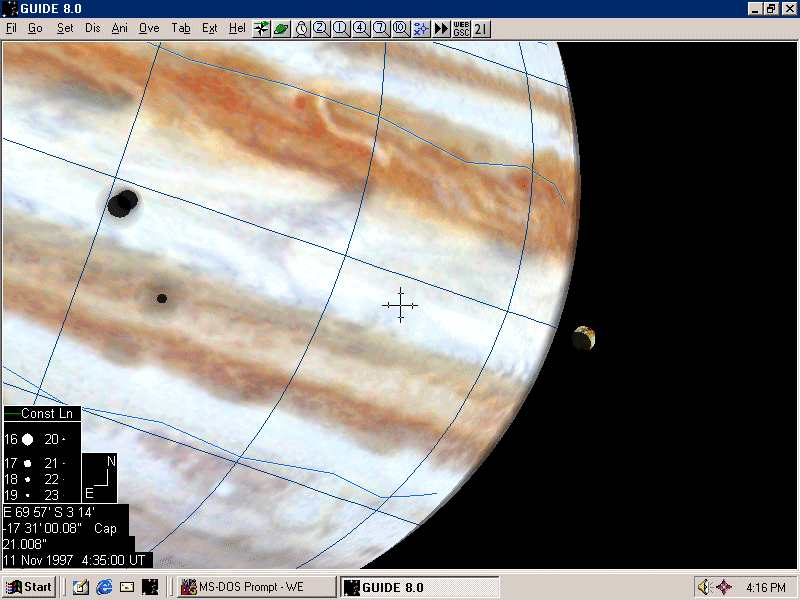
Guide 9.1 shows almost everything in the solar system: artificial satellites, all planets and almost all of their satellites, Sun, Moon, comets, and asteroids. Zoom in on planets and satellites, and features appear, including a highly detailed rendition of the Moon. Lists of planetary events and charts showing the paths of eclipses, occultations, and transits are easy to generate.
Guide 9.1 comes with two built-in databases for star charting: the Tycho-2 dataset, giving detailed information for the brightest 2.5 million stars, and the UCAC-3, which provides positions and magnitudes for about 100 million stars (down to about magnitude 16.). Those needing still more detail can zoom in on a given area, and tell Guide 9.1 to extract data from the USNO-A2.0 or B1.0 catalogues, via Internet. If one happens to have a copy of either catalogue on one's hard drive, Guide 9.1 can be set up to make use of it. Several other "megacatalogues" (UCAC-2, SDSS, GSC-2.4) are also available via Internet.
Guide 9.1 comes with images of almost all deep-sky objects, which pop up in the background when you zoom in on a given DSO; click here to see examples of what this looks like. The images were extracted from the Digital Sky Survey (DSS), and are of excellent quality. The DSO database contains information about over 190,000 galaxies and almost all catalogued open clusters, planetary and diffuse nebulae, globular and open clusters, and so on.
Should this not seem enough, you can zoom in on an area of interest and request a Digital Sky Survey image via Internet. Guide 9.1 will pass the request on to a server at the Space Telescope Science Institute, and after a few seconds (time depends on the image size), the DSS image will pop up in the background.
Guide 9.1 is distributed under the GNU General Public License. This basically means you can use the software as you wish, including making copies for anyone you wish. (There are some limitations -- GPL doesn't mean "public domain" -- but the limits are not nearly as severe as with "normal" software licenses.)
Therefore, if you wish to purchase a copy and make duplicates for your school, astronomy club, neighbors, etc... go ahead; it's legal.
Under the GPL, source code for the program must be provided. You can find some source code here, mostly for the underlying astronomical functions (computing where solar system objects are, precession/nutation, etc.) The rest is in the process of being made ready for on-line publication (mostly a matter of doing a lot of documenting and clean-up so that someone other than the author will have a fair chance of being able to understand it.)
No.
The major reason for this is that it would be extremely painful to try to "condense" Guide 9.1 into a reasonably-sized download. The main benefit of Guide 9.1 is that it has a huge array of features and displays an immense amount of data from many sources; these would have to be cut back sharply to make it small enough to download. Perhaps, if cable modems and similar high-speed connections become common, that situation will change. But at present, it's not possible.
The lack of a demo admittedly makes it harder for prospective users to evaluate the software. To evade this handicap, an effort is made to make these Web pages as descriptive as possible. Screen shots are available on the site. Sample printouts are available, by postal mail, on request. Furthermore, a 30-day unconditional guarantee is provided. Many people have used this as a sort of "trial period". Returns are sufficiently rare that this method apparently works quite well.
Guide 9.1 is quite gentle on system requirements. It will run on any version of Windows from XP to 10.0. It requires a DVD drive for installation.
Guide 9.1 can be run on Macs and Linux; click here for details.
Hard disk space: Guide 9.1 is distributed on a DVD. You can install part or all of the DVD on your hard drive; there is a very straightforward utility inside Guide 9.1 to configure this. If you copy absolutely everything, it will consume about 3.5 GBytes of hard drive space. At the other extreme, you can do a "minimal install" of about 15 MBytes, though Guide 9.1 will then provide only the most basic functions if the Guide 9.1 DVD isn't in the drive. (If the Guide 9.1 DVD is in the drive, Guide 9.1 will recognize that fact and make use of it, so you can switch from the "minimal" install to a "full" install. Speed running from the DVD is quite good, though it does speed up if you put everything on the hard drive.)
At intermediate levels, you can select datasets of interest to be copied over to the hard drive, choosing the functions of greatest interest to you.
Some people with older laptops lacking DVD drives have evaded the problem by temporarily installing Guide 9.1 on another PC that does have a DVD drive. Once everything is set up on that machine, with the items you want installed to the hard drive, the whole works can be copied over to the laptop, via network or USB stick.
Guide 9.1 can be switched from the "usual" view, showing an uninverted chart, to show charts that are inverted north/south, east/west, or flipped 180 degrees (as in a refractor without a star diagonal). In addition, one can switch between the default mode with north at the top (the way most star charts are drawn) to a mode where the zenith is at the top (the way the sky actually will look with an alt/az mount, or naked eye, or binoculars). In this latter mode, the horizon runs straight across the screen, from left to right.
One can also combine these modes. For example, a refractor user with an alt/az mount would choose the "zenith up" mode, combined with a flipped chart. This would produce charts with the exact orientation seen at the eyepiece.
It should be noted that almost all decent astronomy software has such features. Guide 9.1 can claim many advantages and unique features, but this is not actually one of them.
The short version is that Guide 9.1 is as accurate, or more accurate, than any other star charting software. Almost all professional software makes use of raw data from the same US Government sources (the National Space Science Data Center and the Astronomical Data Center) for objects such as stars, nebulae, clusters, galaxies, and so on. For planets and the moon, Guide 9.1 uses the JPL DE-406 ephemerides; a variety of theories are used for the Galilean moons and Saturn's moons. All this goes beyond the accuracy needed for "normal" use. But it becomes important if you are, for example, investigating the exact time of an occultation.
Guide 9.1 also makes use of several advances in catalogs, such as the Tycho-2, Hipparcos-2, and UCAC-3 star catalogs. These datasets provide much more precise position, magnitude, proper motion, and parallax (distance) data, for more stars, than was previously possible. Also, the PGC (Principal Galaxy Catalog), with over 190,000 galaxies, is used.
You can click here for full details on the accuracy of various parts of Guide.
Yes, quite well.
Most telescopes can be controlled "directly", without the use of a driver. This includes all Meade and Celestron telescopes, and scopes with compatible protocols (which describes most telescopes).
Any telescope with an ASCOM driver can be controlled, which nowadays means pretty much all telescopes. The ASCOM driver works much the way a printer driver does: it ensures that Guide 9.1 can simply send a command such as "go to this RA/Dec", and the driver will figure out the specific commands needed by the telescope.
Most people will probably use the direct method. It's a little bit simpler and means there's one less component involved. But both work about equally well, and there are situations where you really have no choice but to use ASCOM (to coordinate with other software, for example, or if your telescope uses an exotic control language).
There is a set of screen shots on this page.
This screen shot demonstrates several characteristics of Guide. The objects are positioned to within about an arcsecond, considerably less than the apparent size of Mars. The features are precisely rendered on Mars (allowing for the fact that Mars does change slowly over time); in the case of Jupiter, we are observing clouds, and we don't really know what the weather was like on Jupiter in 1170, or even if the Great Red Spot existed back then! But the major belts, at least, were probably the same then as they are now.
This capability is really quite general; you can make similar charts showing visibility areas for transits, or asteroid occultations of stars, and so on. Click here for some more examples of this capability. A while ago, in response to a question about lunar occultations of visible planets, some further screen shots were posted here.
The "user-added datasets" have expanded over the years, as people sent in the files they used for the feature. Click here for a list of some of the datasets Guide 9.1 can show.
At some point, sample printouts will be uploaded to this page (probably in both .gif and .pdf form).
Yes to both. Printouts always have a white background; but on the screen, you can select one of several "background modes". The default is "normal mode" (white stars on a black background.) Alternatively, you can have "chart mode" (black stars on a white background); "red mode" (red stars on a black background... in fact, everything on screen becomes red or black, to aid night adaptation); "flashlight mode" (black stars on a red background... this can cast enough red light to help you find dropped eyepieces and such); or "realistic mode" (the background is black at night, blue in the day, with various shades of blue and purple during twilight.)
Unfortunately, no. You can, however, click here for the HTML version of the user manual or click here for the PDF version of the user manual.
It's hoped that the software will be intuitive enough that you won't need to use the manual (and it does seem people only use a manual if they are in serious trouble.) But Guide 9.1 is a huge, complex, powerful program. Eventually, you may want to make use of that power to do something a little out of the ordinary. When that happens, the manual will be an excellent reference.
Guide 9.1 comes with a 30-day return policy. Just ship the DVD back with a note requesting a refund. (You need not give any reasons for the return, but it would be appreciated if you did.)
To get the features described on this page, no; everything that has been mentioned is on the DVD. But the software is in an almost constant state of improvement. The best move is probably to run the software for a while, and then to look at the list of improvements on the update page. You may see items there that will persuade you to update.
Yes. There are no restrictions on the use of Guide charts, or other data (such as ephemerides, lists of lunar phases, and so forth) created with Guide. (Most people do include links back to this Web site, or mention that Guide was used to make the charts; this is always appreciated!) Since such use is essentially "free advertising" for Guide, it is much to be encouraged.
If you post Guide charts on your Web site, please e-mail the URL to me. At some point, I would like to create a list of links to such charts, to provide examples of how people actually use Guide.
Although Guide is a native Windows program, it is quite possible to run it using Wine. Wine is a system for running (some) Windows programs under OS/X, Linux, and some other operating systems. Guide is one of those programs. Wine is quite widely used in the Linux world, though less so in the OS/X world. Wine is free/open source software.
A substantial percentage of Guide users are currently running it in Linux, including the developer of Guide. So its compatibility with Wine is well-tested.
There is some documentation on how to install Wine on OS/X (it's not rocket surgery, but it's not a simple "click here to install" process, the way it is in Linux.) There is still more information here. Of course, OS/X users also have a variety of other (non-free) ways of running Windows applications under OS/X, such as Boot Camp and Parallels; Guide is also compatible with those systems.